How Can We Help?
Search for answers or browse our help center.
Load cell troubleshooting
Symptoms- when hit “start”, table doesn’t move & also poundage shows 200+ lbs. instead of what was set.
Cause – either the load sensor or the amplifier on the control board Test-
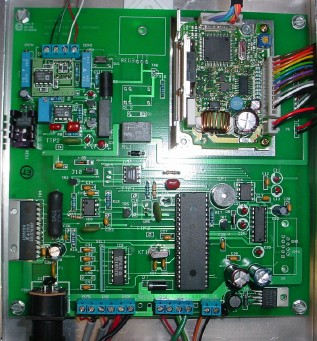
- Remove the large cushion over the foot area of the table and the cover from the aluminum enclosure under it. The board, pictured below, is in the enclosure.
- Make sure the load cell was still connected. The four wires in the top left corner of the picture should be attached.
- If they were all secure on the terminals then disconnect the green and white wires only.
- Add a jumper wire between the terminal with the black wire and the terminal where the green was. Also add a jumper between the green terminal and the terminal where the white was.
- Press “start”
IF the table moves, it is a bad load cell (transducer)
IF the table does not move, it is a bad amplifier on this board
6. Jumpers wires should be removed when reassembled.