How Can We Help?
Search for answers or browse our help center.
-
Hill DT
- 24VDC Power Distribution
- Add cable to slow cervical tilt
- Add visible markers
- Adding a FR 30-21B cervical mount bracket
- Adjust rollers instructions
- Applying grease to the cervical bolts
- Cervical Return Spring
- Cervical springs
- Check preload on lumbar
- Detach from actuator to lumbar
- Enlarge the holes so that shoulder bolts do not contact
- Flex Restraint Parts
- Harness position demonstrated
- How to access the actuator
- How to Align the Cervical Actuator
- How to Disconnect the Air Cylinder on a Distraction Table
- How to Replace the Flexi Strap Bracket on a Hill DT
- How to Replace the Power Supply
- How to Tighten the Tablet Swivel
- Lubricate lumbar actuator rod
- Lubricating points
- Lumbar Tilt Actuator Replacement
- Patient Stop Switch
- Pelvic Tilt Rest Tab
- Power supply and tablet cord
- Relay Board, Link Controller
- Remove Bolts for Roller
- Remove or change cushions
- Repair distraction actuator
- Replace a Linear Bearing
- Replace Cervical Actuator
- Replace Cervical Sensor Harness
- Replace Cervical Tilt Actuator
- Replace Flexi Straps Only
- Replace On/Off Circuit Breaker
- Replace Plunger and Roll Pin
- Replace the Belt
- Replace the Flexi Strap
- Replace the Flexistrap
- Replace the lumbar distraction actuator
- Replace the Lumbar Load Sensor
- Replace the Rods and Bushings on Hill DT
- Replace the Xenus Drive
- Replacing cervical actuator rod, spring and rivet
- Review Lumbar Distraction Assembly
- Securing the receiver tube in the cervical cushion
- Shoulder bolt alignment
- Tablet power supply
- Troubleshooting no power
- Troubleshooting the actuator rod
- Show all articles (35) Collapse Articles
Print
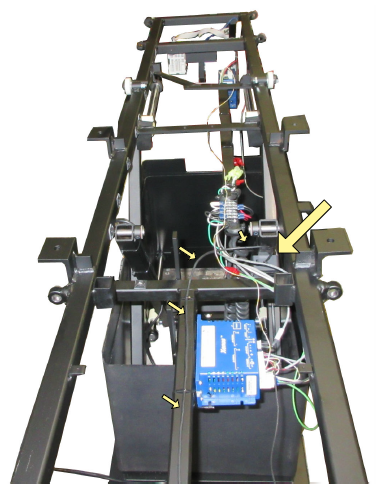
Power supply and tablet cord
The large arrow indicates the power supply for the tablet. The small arrows show the route of the cable toward the head end of the table.