
How Can We Help?
Search for answers or browse our help center.
-
Air Flex I
- Adjusting old style rotation (1993 - 2003)
- Air manifold diagram (2012-2018)
- Alignment of lumbar drop pin on a thoracic & lumbar drop frame
- Auto distraction Kelly connections (2010-2018)
- Auto distraction patient stop switch override (2010-2018)
- Auto distraction patient switch enable
- Auto distraction safety relief valve connected to distraction cylinder (2006-2009)
- Auto flex motor connector (2011-2018)
- Check valve location (2007-2011)
- Hose identification on manifold (2012-2018)
- How to Add Gas Shock to Dual Drop with Raise Feature
- How to add tapeswitches to table (pre-2012)
- How to adjust air pressure on pressure switch (1997-2011)
- How to adjust elevator bolt for auto flex (1999-2018)
- How to adjust lateral lock lever
- How to adjust length of drop on air cylinders
- How to adjust rotation lock handle (2004-present)
- How to adjust the stroke on a thoracic breakaway cylinder
- How to align centering pin and cam on pelvic rotation (2004-present)
- How to attach mechlok mount bracket for tilt head
- How to attach repair bracket for mechlok mount on thoracic frame
- How to attach the pancake cylinder bracket
- How to change out large green board (2012-2018)
- How to check auto distraction connections (2010-2018)
- How to check foot pedal connections (2012-2018)
- How to check squeaking on flexion
- How to disable cervical distraction function (2010-2018)
- How to enable options on touchscreen (2010-2018)
- How to Identify a Kelly Valve Revision / Version for Replacement
- How to lock out rotation on pelvic section (1993-2001)
- How to lock pelvic rotation (2004-present)
- How to lubricate the lateral motion
- How to mute sound on touchscreen (2010-2018)
- How to prevent pull out ankle from jamming when pushed in
- How to purge a valve (2012-2018)
- How to remove auto distraction feature with auto flex (2010-2011)
- How to remove wobble from flex lock handle (1993-2018)
- How to replace a valve on the manifold (2012-2018)
- How to reset the click (PLC) for auto distraction or auto flexion (2010-2018)
- How to tighten pelvic rotation (1993-3/2006)
- How to tighten set screw on parker auto flex motor
- How to tighten the auto flex gear on the motor shaft (12/2006-2018)
- How to troubleshoot air coming out of unloader (1993-2011)
- How to troubleshoot weak drops (2012-2018)
- If the distraction doesn't glide smooth
- INS-04 Replacing Rotation Lock Assembly (1999-2003)
- INS-104B Adjusting the Rotation Lock (pre-2003)
- INS-123 Instructions for Converting Regular Height to Short Height
- INS-126 How to replace the check valve (1993-2011)
- INS-5A Instructions for replacing a coil on the valve bank (1993-2011)
- INS-77 Instructions for changing the short cable assembly
- Inspecting height capacitor wires
- Installing a Lock-Out device for the Pelvic Rotation (2001-2003)
- Installing firmware (2012-2018)
- Locating a broken bolt on the lifter tube assembly
- Marshbellofram connections for Auto Distraction (2006-2009)
- Marshbellowfram air line connections (2006-2009
- Pelvic drop does not stay up
- Quick set guide for auto distraction
- Rebuilding Allenair Air Cylinders (1993-6/2007)
- Reed switch test (3/2004-12/2006)
- Replacing the Linear Bearing in a Drop Mechanism
- Repositioning rotation pin with no pelvic drop (2004-present)
- Repositioning rotation pin with pelvic drop (2004-present)
- Rotation lock engaging reference (2004-present)
- Temporary by-pass of auto distraction (2006-2011)
- Tightening the Lateral Lock Adjustment
- Troubleshooting auto distraction with a marshbellowfram
- Troubleshooting auto flex motor not starting (2011-2018)
- Troubleshooting coil and valve (1993-2011)
- Troubleshooting green board or power button shutting down (2012-2018)
- Troubleshooting thoracic & lumbar drops
- Valve manifold identification (2012-2018)
- Verifying the pelvic rotation centering pin (2004-present)
- What to check if compressor never shuts off
- Show all articles (60) Collapse Articles
Print
How to mute sound on touchscreen (2010-2018)
There is a trap door on the back of the touchscreen. Under the door there are 2 DIP switches next to the battery. The normal position of the switches should be OFF.
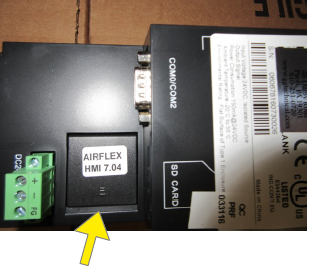
The door can be opened by lifting this edge with a fingernail.
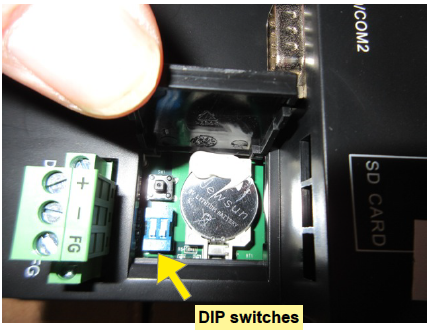
To disable/enable the beeper:
- Unplug the table power cord
- Open the trap door on the back of the touchscreen.
- Place both DIP switches in the ON position
- Plug in the table power cord. The touchscreen will be in Set-up mode
- Select the “General Settings” tab at the top
- Select the “Mute” box to disable buzzer
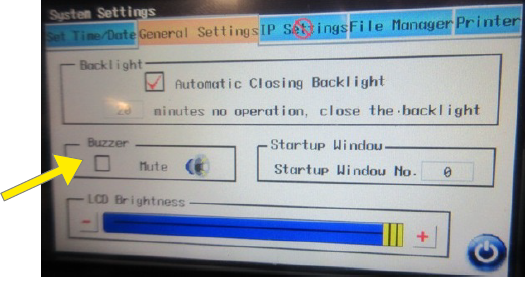
- Unplug the table power cord
- Place both DIP switches in the OFF position
- Plug in the table power cord. The table is ready for use