
How Can We Help?
Search for answers or browse our help center.
Replace Board in Control Box
AFT w/ Air
Replace Board in Control Box
IM P O R TA N T:
- The button layouts will vary. The mounting information is the same for all boards.
- The version of the board is identified in the corner. The control box on the primary side of the table must have an “A ” board (may also be blank). The second box has a “B” board.
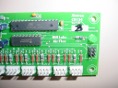
- Unplug the table.
- The front panel of the control box can be accessed by removing the four corner screws.
- The new board will come with mount angles already attached provided to remove the two screws on the front of the button panel to release the original.
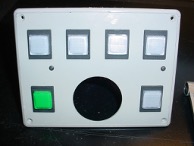
(4 corner screws to remove the front panel, 2 middle screws will release the circuit board.)
- The communication cable disconnects from the board the same as a phone cord. Press the tab in on the side of the connector as you pull it.
- Hold the new board next to the original and pull one connector at a time from the original board and push it onto the same location of the new board.
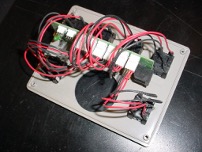
- Attach the board to the panel and the panel to the box. The picture below shows the board orientation.
Hill Laboratories 3 N Bacton H ill Rd., PO Box 2028, Frazer, PA 19355 Ph (610)644-2867