Search for answers or browse our help center.
Add Patient Control Switch
Mounting Patient Control Switch
1. Run table top to food end.
2. Unplug Table.
3. Remove table top and filler block.
4. Detach power cord inside base.
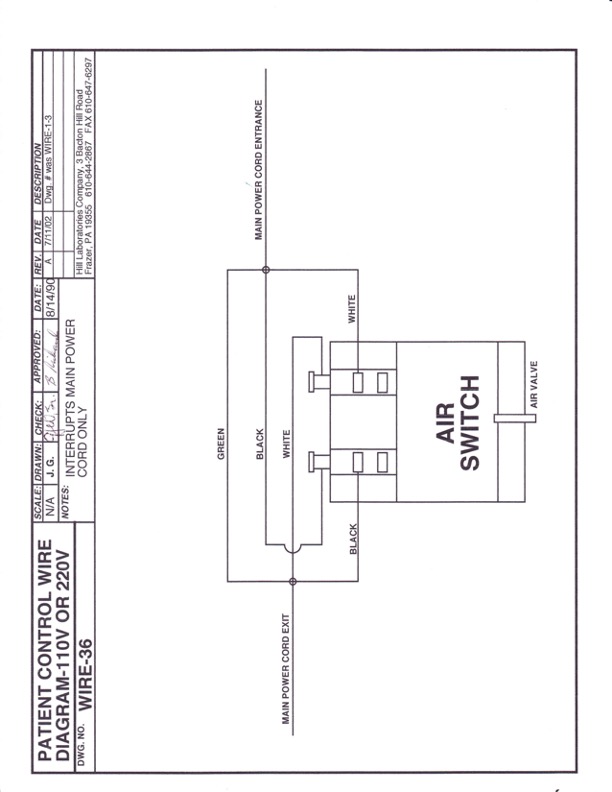
5. Cut power cord roughly 16″ from its end at the table controls. Bare wires and connect green to green. Crimp female terminals to black and white leads.
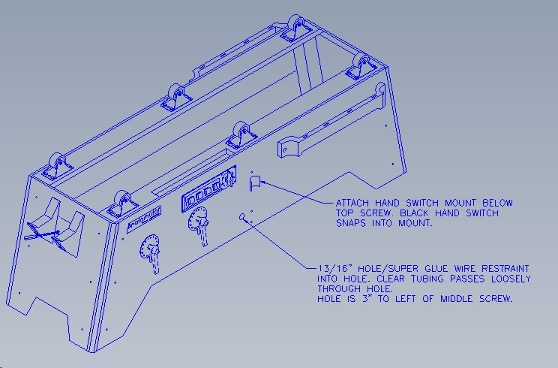
6. Drill 13/16″ hole in side (see drawing) glue black wire restraint into hole.
7. Mount air switch inside table with clear tubing passing through wire restraint to outside of table.
8. Plug terminals onto switch according to wire diagram (Below).
9. Reattach power cord to inside of base with staples.
10. slide tubing onto post of patient hand control.
11. Attach hand control mount as per drawing. Hand switch snaps into mount.
12. Replace filler block and table top.
13. With table running, hand switch should both stop and start table as long as the timer is still running and the switch is on.