How Can We Help?
Search for answers or browse our help center.
-
HA90P Podiatry
- Add auto return function
- Add Auto-Return Function
- Add Clear Cover to Foot Cushion
- Add Clear Cover to Foot Cushion w/ Hook and Loop
- Add Clear Cover with Snaps
- Add Drawer Slide Tray
- Add Plastic Cover to Foot Cushion
- Adding a corner cover on the seat
- Clear cover on foot cushion
- Components of a Lift Back actuator
- Convert Standard Height to Low (Autoreturn)
- Convert standard height to low height
- Foot section mechlok function
- How to replace a circuit board
- How to swap wires on circuit board
- How to tighten tray retainer
- Lift Back Actuator
- LiftBack comes up but won't go down
- Location of actuator for Trendelenburg feature
- Microswitch assembly
- Microswitch locations
- Move LiftBack microswitch
- Podiatry Tray (with Tray Already Mounted on Cushion)
- Power Supply for Electric Foot
- Relay locations (pre-6/2005)
- Replace Clear Cover, Snap Version
- Replace Foot Actuator
- Replace Foot Mechlok
- Replace Ice Cube Relay
- Replacing or Adjusting the Retaining Screw
- Replacing the pull out tray assembly
- Replacing the Receiver Bracket
- Replacing the Tray Adjusting Connector
- Replacing the tray tilt bolt
- Reversing foot section mechlok function
- Seat Cushion Corner
- Stop Collar for Mayo Tray Combo
- Tightening the scissor set screws
- Tilt pedal terminal diagram
- Tray not staying retracted
- Troubleshooting Lift Back capacitor
- Troubleshooting microswitch and plunger
- Troubleshooting tilt function
- Show all articles (28) Collapse Articles
Print
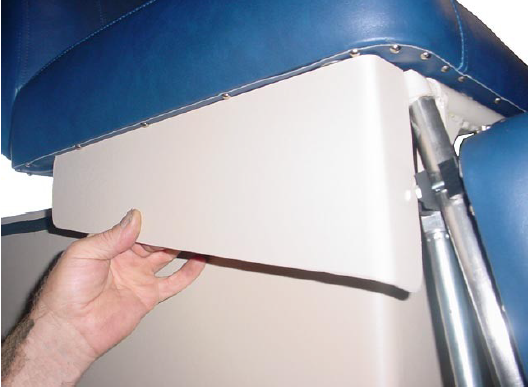
Adding a corner cover on the seat
Hold the cover against the bottom of the seat cushion, as shown. It will be located along the inside edge of the row of tacks and 1 ¼ ” from the end of the cushion.
Secure the cover to the cushion with the enclosed screws.