How Can We Help?
Search for answers or browse our help center.
-
Air Flex
-
- Adjusting old style rotation (1993 - 2003)
- Air manifold diagram (2012-2018)
- Alignment of lumbar drop pin on a thoracic & lumbar drop frame
- Auto distraction Kelly connections (2010-2018)
- Auto distraction patient stop switch override (2010-2018)
- Auto distraction patient switch enable
- Auto distraction safety relief valve connected to distraction cylinder (2006-2009)
- Auto flex motor connector (2011-2018)
- Check valve location (2007-2011)
- Hose identification on manifold (2012-2018)
- How to Add Gas Shock to Dual Drop with Raise Feature
- How to add tapeswitches to table (pre-2012)
- How to adjust air pressure on pressure switch (1997-2011)
- How to adjust elevator bolt for auto flex (1999-2018)
- How to adjust lateral lock lever
- How to adjust length of drop on air cylinders
- How to adjust rotation lock handle (2004-present)
- How to adjust the stroke on a thoracic breakaway cylinder
- How to align centering pin and cam on pelvic rotation (2004-present)
- How to attach mechlok mount bracket for tilt head
- How to attach repair bracket for mechlok mount on thoracic frame
- How to attach the pancake cylinder bracket
- How to change out large green board (2012-2018)
- How to check auto distraction connections (2010-2018)
- How to check foot pedal connections (2012-2018)
- How to check squeaking on flexion
- How to disable cervical distraction function (2010-2018)
- How to enable options on touchscreen (2010-2018)
- How to Identify a Kelly Valve Revision / Version for Replacement
- How to lock out rotation on pelvic section (1993-2001)
- How to lock pelvic rotation (2004-present)
- How to lubricate the lateral motion
- How to mute sound on touchscreen (2010-2018)
- How to prevent pull out ankle from jamming when pushed in
- How to purge a valve (2012-2018)
- How to remove auto distraction feature with auto flex (2010-2011)
- How to remove wobble from flex lock handle (1993-2018)
- How to replace a valve on the manifold (2012-2018)
- How to reset the click (PLC) for auto distraction or auto flexion (2010-2018)
- How to tighten pelvic rotation (1993-3/2006)
- How to tighten set screw on parker auto flex motor
- How to tighten the auto flex gear on the motor shaft (12/2006-2018)
- How to troubleshoot air coming out of unloader (1993-2011)
- How to troubleshoot weak drops (2012-2018)
- If the distraction doesn't glide smooth
- INS-04 Replacing Rotation Lock Assembly (1999-2003)
- INS-104B Adjusting the Rotation Lock (pre-2003)
- INS-123 Instructions for Converting Regular Height to Short Height
- INS-126 How to replace the check valve (1993-2011)
- INS-5A Instructions for replacing a coil on the valve bank (1993-2011)
- INS-77 Instructions for changing the short cable assembly
- Inspecting height capacitor wires
- Installing a Lock-Out device for the Pelvic Rotation (2001-2003)
- Installing firmware (2012-2018)
- Locating a broken bolt on the lifter tube assembly
- Marshbellofram connections for Auto Distraction (2006-2009)
- Marshbellowfram air line connections (2006-2009
- Pelvic drop does not stay up
- Quick set guide for auto distraction
- Rebuilding Allenair Air Cylinders (1993-6/2007)
- Reed switch test (3/2004-12/2006)
- Replacing the Linear Bearing in a Drop Mechanism
- Repositioning rotation pin with no pelvic drop (2004-present)
- Repositioning rotation pin with pelvic drop (2004-present)
- Rotation lock engaging reference (2004-present)
- Temporary by-pass of auto distraction (2006-2011)
- Tightening the Lateral Lock Adjustment
- Troubleshooting auto distraction with a marshbellowfram
- Troubleshooting auto flex motor not starting (2011-2018)
- Troubleshooting coil and valve (1993-2011)
- Troubleshooting green board or power button shutting down (2012-2018)
- Troubleshooting thoracic & lumbar drops
- Valve manifold identification (2012-2018)
- Verifying the pelvic rotation centering pin (2004-present)
- What to check if compressor never shuts off
- Show all articles (60) Collapse Articles
-
- Add tape switch (tables beginning Jan 2019)
- Add Tape Switch (Tables January 2019 - Present)
- Air Flex II Power Switch
- Change HMI
- Changing HMI on an Air Flex II Table (2010 - 2018)
- Communication Cable Connection
- How to change or replace the touchscreen (HMI)
- How to Replace the Check Valve
- How to Replace the Communication Cable Connection
- PLC Power Connector
- Power Connector to the PLC
- Replace PLC
- Replace the Harness for a Touch Screen
- Replace the Power Supply Board
- Replace the VPPM
- Replace Unloader Valve, Air Flex II, Tables 2019 - Current
- Replacing the PLC
- Replacing the Power Supply Board
- Replacing the unloader valve
- What version is my firmware?
- Show all articles (5) Collapse Articles
- 3-Way Switch Wiring Diagram
- 4-Drop air hose layout (1993-2011)
- 4-Way Switch Diagram
- Add a Filter
- Add a Tape Switch to Tape Switches
- Add Auto-Drain Air Filter
- Add AutoFlex Feature
- Add Distraction - Only Add Lumbar
- Add Double Touch to a Table w/ No Printed Board
- Add Drop Function to an 8-inch Cushion
- Add Drop Function to an 8in Cushion
- Add Filter to Airflex
- Add Flex Head Head or CBP Head
- Add Flex Head or CBP Head
- Add Flow Control to the Pelvic Drop
- Add Rotation
- Add Second Bolt-On Control Box
- Add Second Control Box
- Add Side Supports
- Add Square Tape Switch Above Touch Screen
- Add Tape Switch ( Airflex 2012 - 2018; AirC/Deluxe AFT 2012 - Present)
- Add Thoracic Breakaway
- Adding a Corded Pedal to a Table with One Corded Foot Pedal
- Adding a Gripper Bar Assembly
- Adding Flow Control Valves (Valve Restrictors) to Air Drops
- Adjustable Rotation Lockout Bar
- Adjusting the Flex Position Sensor (January 2019 - Present)
- Air Flex Auto Distraction (Tables Built Feb 2010 - Dec 2018)
- Airflex Ankle Mechlok
- Ankle Mechlok Stop
- Bolt-on Gripper Bars Set
- Cervical Tilt Mechlok Unit
- Change height from 22.5" to 21.5"
- Compressor Capacitor
- Control box location mounted on cushion (1993-2011)
- Cushion Post Assembly
- Cylinder Rebuild
- Finger Guards
- Flex Lock Rack Replacement
- Flow Control Valve
- Flow Control Valve for 8 in Thoracic and Lumbar Drops
- How to Add Flow Control to the Pelvic Drop of an Air Flex Table
- How to Disconnect the Air Cylinder on an Air Flex Table
- How to Mount a Pelvic Cushion onto an Air Flex Table
- How to Replace a Tape Switch on an Air Flex Table
- How to Replace the Upper Pivot Lock Lever on an Air Flex Table
- If scissor pin loosens or comes out
- Increase Hose Size from the Compressor
- Install Sleeve Bushing
- Install Snap-Grip
- Installing raised Ankle on AFT or Airflow
- Lumbar Cylinder Mount
- Manifold Valve
- Modify Original Cushions for New Style Drop Rods
- Modify Thoracic Cushion
- Modifying "Long" (18 3/4") Pelvic Cushion for Rotation with Mechlok
- Motor Terminal Block
- Mount at Square End of Thoracic Cushion
- Mount for Lateral Head Mechlok
- Mounting a Mechlok Release
- New Motor Wiring
- Pancake Repair
- Pelvic Cushion Spacer
- Pelvic Drop Rod Washer
- Pelvic Drop, Steel Ball
- Power Supply (After 2003)
- Pressure Gauge Replace
- Rebuild Compressor
- Reed switch mounting (2011-2018)
- Relocate Mechlok Mount Tube Relative to the Hinges
- Remove the Selector Knob from Socket
- Removing Cushions
- Repair Bracket for Mechlok Mount on Thoracic Subframe
- Repair Bracket for Mounting the Thoracic Mechlok (Tables January 2013 - Present)
- Repair Bracket for Mounting Thoracic Mechlok
- Repair Coupling Nut
- Repairing the Head Piece Mechlok Unit
- Replace 6-Gang Manifold
- Replace a Tape Switch
- Replace a Valve on the Manifold
- Replace Air Compressor
- Replace Air Filter
- Replace Air Filter (April 2007 - Present)
- Replace Air Filter (Tables before April 2007)
- Replace Allenair Felxion Cylinder with Festo Brand
- Replace Board in Control Box
- Replace Check Valve
- Replace Distraction Assembly
- Replace Distraction Frame Only
- Replace Flat Spring
- Replace Flex Lock and Flexion Cylinder
- Replace Flex Lock Assembly
- Replace Flexion Cylinder
- Replace Flexlock Assembly
- Replace Furnace Brand Pressure Switch (Tables Built Before March 1997)
- Replace Furnace Brand Pressure Switch (Tables Made March 1997 - Present)
- Replace Gast Air Compressor
- Replace Marsh Bello Fram with Kelly and Touchscreen
- Replace Mechlok Mount (Airflex 2013 - Current)
- Replace Mechlok Mount (Tables 2013 - Current)
- Replace Original Distraction Cylinder with 2-inch
- Replace Pelvic Drop Pin
- Replace Pressure Pedal
- Replace Pressure Switch, but Keep Original 2-Ware Compressor
- Replace Raised Head with Lateral Raised Flex Head or CBP
- Replace Reed Switches (February 2008 - June 2009)
- Replace Reed Switches (Tables thru Feb 2008)
- Replace Rotation Lock Cam
- Replace Spring in Thoracic or Lumbar
- Replace Square-D Pressure Switch
- Replace Tension Spring in Thoracic & Lumbar
- Replace Tension Spring in Thoracic and Lumbar
- Replace the 4-Position Selector Switch
- Replace the Air Compressor
- Replace the Air Cylinder
- Replace the Air Cylinder Clevis
- Replace the Autoflex Motor
- Replace the Banjo Fitting
- Replace the Click Controller
- Replace the Communication Cable
- Replace the Extension Spring
- Replace the Flex Cylinder (Tables 2019-present)
- Replace the Flex Cylinder (Tables Oct 2007 - Dec 2018)
- Replace the Flex Lock Lever
- Replace the Flex Lock Spring
- Replace the Flex Position Sensor (Tables 2019 - Present)
- Replace the Glide Bar Guide
- Replace the Main Board
- Replace the Plunger Bracket
- Replace the Pressure Relief Valve
- Replace the Solenoid
- Replace Thoracic Breakaway Cylinder
- Replace Thoracic Mechlok
- Replacing a Coil on Deluxe Version
- Replacing a Push Button Switch
- Replacing a Valve
- Replacing a Valve on a Table with 1 or 2 Drops
- Replacing a Valve on Deluxe Version
- Replacing a Wire to the Valve
- Replacing Air Compressor with No Capacitor and 2 Wires With a Compressor That Has a Capacitor and 3 Wires
- Replacing Raised Ankle on AFT or Airflex
- Replacing the Motor on an Autoflex
- Replacing the Plastic Air Tank
- Rotation lock out explanation (1993-2003)
- Rotation Pivet Weldment (Yoke) Replacement
- Rotation Pivot Casting Replace
- SMC to Festo Replace
- Spartan air hose diagram (1993)
- Tension Knob Friction Plates
- Thoracic and lumbar drop pin assembly
- Thoracic Breakaway - Flow Control Valve
- Thoracic Cable Routing
- Thoracic drop pin alignment
- Thoracic mechlock release with air cylinder
- Turn off Sound to Touch Screen
- Unloader Valve
- Untitled
- When Gear on Motor is Not Staying Engaged
- Wire Colors for Board Replace
- Wire Harness
- Wiring of control box for deluxe (Rear View)(1993-2011)
- Show all articles (146) Collapse Articles
-
Print
Replace Rotation Lock Cam
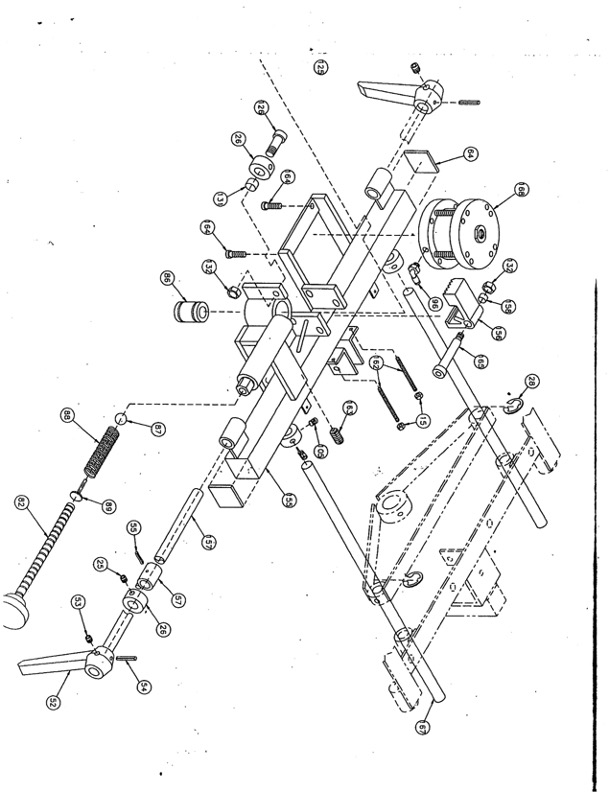
REPLACING ROTATION LOCK CAM
- Remove handle: loosen set screw and remove roll pin #52, 53, 54 on exploded view
- Remove # 56 by takeing shoulder bolt off (#165)
- Remove roll pin from original cam
Cam should be accessible after removing # 56 (lateral lock)
4. Slide the bar out from side with handle still attached
5. Note that there is also a lock collar that will need to be loosened as well
(#25 lock collar)
6. When drilling new hole for new cam offset from original don’t try to use the same hole